CAD Studio - CAD/CAM/GIS/BIM/PLM solutions





 The new add-on application CADstudio DWGsign for AutoCAD and other products of the AutoCAD 2015 and 2016 families signs your drawing document (project, block or template) with a permanent invisible watermark - a "signature" containing your name or the name of your company. This add-on helps to protect your intellectual property, as you can prove the authorship of your original content not only in the signed DWG but also in any future DWG file which is based on such signed document. You can also display your original signature (watermark) in a DWG drawing using the free application DWGsign Reader.
If you sign your company templates (.DWT files) with DWGsign, all new drawings based on these templates will be automatically "signed" (marked with invisible watermark).
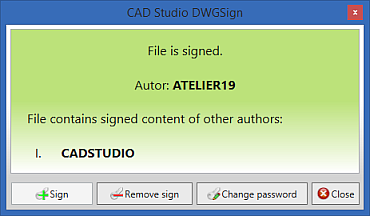
Please note, that DWGsign does not prove unmodified state of the original document (like digital signature does), it proves that a document is based on your original data. The signature remains part of the DWG file even if the DWGsign utility is not installed on a particular workstation.
We prepare a similar application also for the protection of BIM data in Revit projects (RVT) and families (RFA).
More information, video presentation and price - see DWGsign

CAD Studio s.r.o. (an Arkance Systems company) is the leading Czech Autodesk Platinum artner (& Autodesk Top Dealer 1994-2020),
Autodesk Developer, Autodesk Consulting Partner + Training Center. More about CAD Studio.
CAD Studio provides systems - hardware, software, services - for CAD, GIS,
CAM, PLM, FM, animation and computer graphics. Our solutions are based on Autodesk technologies
- AutoCAD, Inventor, Revit, Map, Civil 3D, Plant 3D, Fusion 360, 3ds Max and other Autodesk products, plus our CAD services.
CAD Studio is an ADN member and developer of high quality
CAD, GIS and PDM applications - Revit Tools, Inventor X-Tools,
Civil Tools, VRMLout,
Excellink, DwgText,
CITin, SureSave,
LogOff,
DWGsync, JobTime,
LT Extension, etc...
You can use the  icon to place your order online.
We offer custom application development, training and software localization services. See our 3.000+ CAD Tips.

 CAD videos on YouTube
|
|


