CAD Studio - CAD/CAM/GIS/BIM/PLM solutions



 VRMLout for AutoCAD
These two add-on application are no longer supported - we recommend Forge-based web publishing of 3D models
 VRMLout for AutoCAD ("VRML Export") is an ARX application for AutoCAD Rel.13/14, AutoCAD
2000/i/2002, 2004/2005/2006, 2007/2008/2009, 2010, 2013, 2014, 2015, 2016 AutoCAD Architecture, Architectural Desktop and Mechanical
Desktop. It allows to export any 3D solid from AutoCAD to the VRML format (Virtual Reality
Markup Language). VRMLout also exposes an ActiveX API (for VisualLISP and
VBA) which allows to use VRML export also from your aplications and scripts.
VRMLout for AutoCAD ("VRML Export") is an ARX application for AutoCAD Rel.13/14, AutoCAD
2000/i/2002, 2004/2005/2006, 2007/2008/2009, 2010, 2013, 2014, 2015, 2016 AutoCAD Architecture, Architectural Desktop and Mechanical
Desktop. It allows to export any 3D solid from AutoCAD to the VRML format (Virtual Reality
Markup Language). VRMLout also exposes an ActiveX API (for VisualLISP and
VBA) which allows to use VRML export also from your aplications and scripts.
VRML Translator for Inventor simply adds VRML export to Autodesk Inventor
5.3/6, 7/8/9/10, 11, 2008/2009/2010 and 2011/2012/2013 and 2014/2015/2016's export formats.
| "P.S. Jste sikulka!" |
| Jirka Zara, Dept. of Comp. Sci., Czech Technical University |
| "One such gap has been the lack of support for exporting AutoCAD drawings to VRML, for inclusion in Web sites. CAD Studio has attempted to fill just that gap, and in the true spirit of the Web and of Autodesk's "Virtual Corporation", is based in the far-away land of the Czech Republic." |
| Peter Sheerin, CADENCE Magazine |
| "Thanks for great news Jan!!" |
| Brenda Discher, MCAD product manager, Autodesk Inc. |
| "In the recent german iX computer magazine VRML review all vrml aware cad applications and converters were discussed. All? All but AutoCAD with vrml.arx!" |
| Reini Urban, VRMLout user through Internet |
| "This software has proven to be effective right out of the box with our AutoCad package. We are currently working on a project that requires support from remote locations and your software has aided in the viewing of Cad drawings via the web." |
| Frank Williams, Lockheed-Martin Michoud Space Systems, Manned Space Flight Center Operations |
VRMLOUT requires AutoCAD 2016, 2015/2014/2013, 2011/2010, 2009/2008/2007 or 2006/2005/2004 or 2002/2000/i (a separate version for R13c4/R14), AutoCAD Architecture 2008-2015, Architectural Desktop 2007 or 2006/2005/2004 or 3.3 or Mechanical Desktop R4-6/2004-2008 running on Windows 2000/XP or Vista (w/o UAC) or Windows 7 or Windows 8/8.1 or Windows 10. Exported VRML files can be rendered by any standalone or Internet browser with apropriate VRML plug-in module (e.g. Cortona, Live3D, Cosmo, Blaxxun 3D Viewer ...).
You can use command line, toolbar or LISP API to invoke VRMLout commands:
 AutoCAD-assigned ACI color of a solid is respected in the resulting VRML scene.
Multicolor objects and nested objects are supported. Any URL address can be attached
to any object in VRML model (using standard AutoCAD commands) - VRMLout is compatible
with Internet Publishing Kit (and AutoCAD hyperlinking). You can use the VRMLPROPS
command to set specular color, emissive color, shininess, transparency and other
object properties. The quality of translation from 3D solid to VRML object (smoothness)
depends on AutoCAD's FACETRES system variable. 3D view of the scene can be set by
setting UCS.
AutoCAD-assigned ACI color of a solid is respected in the resulting VRML scene.
Multicolor objects and nested objects are supported. Any URL address can be attached
to any object in VRML model (using standard AutoCAD commands) - VRMLout is compatible
with Internet Publishing Kit (and AutoCAD hyperlinking). You can use the VRMLPROPS
command to set specular color, emissive color, shininess, transparency and other
object properties. The quality of translation from 3D solid to VRML object (smoothness)
depends on AutoCAD's FACETRES system variable. 3D view of the scene can be set by
setting UCS.
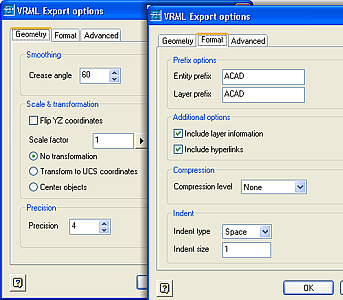
In VRMLOPTIONS you can choose to include layer information and entity hierarchical structure in the VRML file. Resulting VRML files can be internally compressed (recommended for web use, supported by most VRML viewers). Since ver.3.3 you can also set numerical precision, preset default viewpoint, enable background color and reuse material nodes in the VRML file. VRML 1.0 or VRML 2.0 (97) format can be selected (V3.x supports only VRML97). Since ver.5.0 you can include block names.
For "Architectural Desktop" operation mode you can use either Architectural Desktop or plain AutoCAD with AEC Object Enabler loaded. VRMLout retains object hierarchical structure.
VRMLout ActiveX API exposes numerous Objects, Methods ans Properties to be used in your applications and routines (since ver.3.4).
VRML output is viewable in standalone viewers, in Netscape Navigator or MS Internet
Explorer (and other browsers) with an apropriate 3D plug-in.
If you are using the Cortona viewer make sure you select the VRML2.0 option and
either assign a explicit color to your AutoCAD object (e.g. green sphere) or uncheck
the 'Use AutoCAD colors' box (V2).
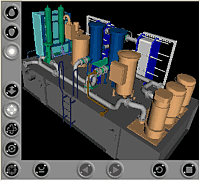 (requires a browser with installed plugin for .wrl viewing)
Other models can be found on our users' webpages, e.g.:
Some other VRMLout users:
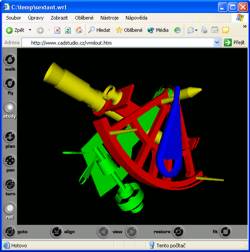 University Karslruhe (Germany)
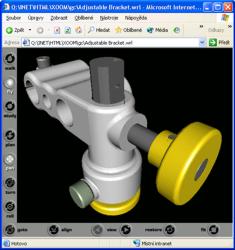 VRML Translator for Inventor simply adds VRML export to Autodesk Inventor 5.3/6/7/8/9/10/11, 2008/2009/2010 and 2011/2012/2013 and 2014/2015/2016/2017/2018/2019
export formats. VRML Translator is an Autodesk Inventor Certified application by
CAD Studio (former Xanadu).
VRML Translator for Inventor simply adds VRML export to Autodesk Inventor 5.3/6/7/8/9/10/11, 2008/2009/2010 and 2011/2012/2013 and 2014/2015/2016/2017/2018/2019
export formats. VRML Translator is an Autodesk Inventor Certified application by
CAD Studio (former Xanadu).
VRML Translator requires the 32-bit or 64-bit (since 2012) version of Autodesk Inventor R5.3 or R6/R7/R8/R9 or R10/R11 or 2008/2009 or 2010/2011/2012 or 2013/2014/2015 or 2016/2017/2018/2019 (or Inventor Professional) running on Windows NT or Windows 2000 or Windows XP or Win7 or Win8 or Win10. VRML files can be rendered by any Internet browser with apropriate VRML plug-in module (e.g. Cortona, Live3D, Cosmo, Blaxxun 3D Viewer ...).
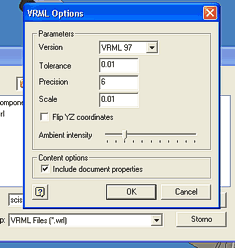 VRML Translator is very easy to use - just use the "File > Save copy as" function
in Autodesk Inventor to save your current part (.IPT) or assembly (.IAM) to a WRL
format file.
VRML Translator is very easy to use - just use the "File > Save copy as" function
in Autodesk Inventor to save your current part (.IPT) or assembly (.IAM) to a WRL
format file.
You can use the Options button in the 'Save copy as' dialog to set the output format, facetting tolerance, numeric (coordinates) precision, scale, flipping of Y-Z coordinates, intensity of ambient light and document properties.
Exported VRML file also contains 6 predefined views - Top, Bottom, Front, Back, Left and Right. If your VRML viewer (browser) supports Views (Viewpoints), you can use these predefined views to display your model.
See sample video: VRML Translator 
(requires a browser with installed plugin for .wrl viewing)

 textures are not supported
| VRMLOUT mail-list | |||
|---|---|---|---|
| Stay informed about the latest version of VRMLout - subscribe to CADstudio software news mail-list. | |||
Please send possible questions and problems to info@cadstudio.cz or use our discussion forum.
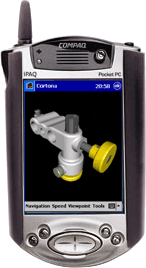 To work with VRML 3D models on mobile PCs (WinCE, PocketPC) you can use the mobile
version of Cortona player (Pocket Cortona - www.parallelgraphics.com). You can transfer
you VRML files from Inventor to your Pocket PC (iPAQ, Jornada, ...). It can be an "mobile" alternative to 3D DWF.
To work with VRML 3D models on mobile PCs (WinCE, PocketPC) you can use the mobile
version of Cortona player (Pocket Cortona - www.parallelgraphics.com). You can transfer
you VRML files from Inventor to your Pocket PC (iPAQ, Jornada, ...). It can be an "mobile" alternative to 3D DWF.
We offer VRMLout also as an OEM license. This kind of license is currently used by two Autodesk MAI partners - SPI (Germany) and Mechsoft.com/CADis (Czechia).
VRMLout technology is also used in some of our custom development projects - e.g. in gbXML and TreppenStudio.
Shareware version is free and can be copied for free - in the original installation pack. Shareware version for AutoCAD and ADT is limited to 15 days and to export of only one object at a time; shareware (trial) version for Inventor is limited to 15 days.
VRMLout Prices / Orders:
Registration codes are valid for all updates of the same product version. Updates can be installed without having to re-enter the registration code.
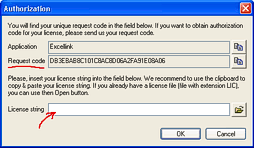
Delivery: VRMLout (or the authorization code) is delivered electronically - via e-mail. Please install the trial version first and specify your unique Request code in your order (available in VRMLout startup dialog, Authorize button - see on the right). Orders are processed within one business day.

| VRMLout | MDT only |
| Transparency | Only opaque |
| Color attributes | No |
| Scale settings | Only unitless |
| URL linking | No |
| VRML 2/97 support | VRML 1 only |
| Compressed WRL | No |


